 carjourney
From the CarJourney journal
How to Track Car Maintenance Records: A Step-by-Step Guide
Table of Contents
- Why Tracking Car Maintenance Records Matters
- How to Track Car Maintenance Records: Digital vs. Analog Methods
- Building a Digital Car Maintenance Log
- Creating a Car Maintenance Spreadsheet Template
- Organizing Receipts, Invoices, and Service Documentation
- Tracking Maintenance by Service Intervals and Mileage
- Tracking DIY Work, Modifications, and Professional Services
- Using Your Maintenance Records to Verify Vehicle History and Boost Resale Value
How to Track Car Maintenance Records: A Step-by-Step Guide
Last Updated: August 2, 2026
Learning how to track car maintenance records is one of the smartest investments you can make in your vehicle's longevity and resale value. A verifiable service history can increase your vehicle's resale value by 10-15%, according to automotive market research, while also protecting you from costly repeat repairs and warranty disputes.
The difference isn't just about having records, it's about having accessible, organized, and verifiable records that tell the complete story of your car's care. Below, we'll walk you through every method for tracking car maintenance records, from simple spreadsheet templates to cloud-based digital systems.
Why Tracking Car Maintenance Records Matters
Organized maintenance logs protect you from repeating expensive repairs and help you spot patterns that indicate problems. A digital or physical log prevents wasting money on services you've already paid for. For DIY enthusiasts and project car builders, maintenance records become essential documentation of your work, creating a complete build history that future buyers want to see.
Service records also protect your warranty coverage. Many manufacturers require documented maintenance at approved intervals. Without proof, you could lose coverage on a major repair that would have been covered.
How to Track Car Maintenance Records: Digital vs. Analog Methods
The method you choose depends on your lifestyle, comfort with technology, and how much detail you want to capture. Most vehicle owners find that a hybrid approach, digital records with physical backups, works best.
Digital Maintenance Tracking Systems
Digital tracking offers speed, searchability, and automatic reminders tied to both time and mileage. Cloud-based systems sync across devices, so you can log a service from your phone at the mechanic's shop and access it later from your laptop.
Once you set up your vehicle's information and service intervals, the system reminds you when an oil change is due based on both elapsed time and miles driven. You can upload photos of receipts directly, tag services by category, and generate reports instantly. For multi-vehicle households, digital systems let you manage multiple vehicles without mixing up their histories.
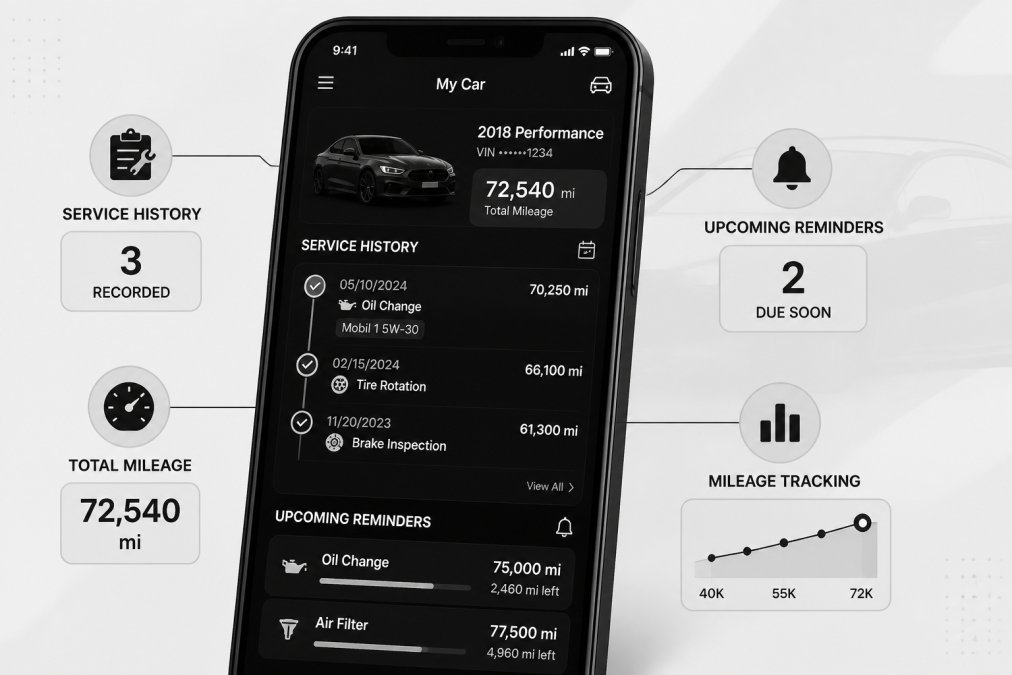
The trade-off is data security. You're trusting a platform with your vehicle's complete history, including VIN and modifications. Reputable platforms encrypt this data and allow you to control sharing permissions.
CarJourney simplifies this process with VIN-based vehicle setup that auto-populates your car's specifications. The platform's AI-powered logs let you quickly record services, and you can generate shareable build profiles that prove your vehicle's care history to potential buyers without exposing your personal information publicly.
Physical Record Organization
If you prefer keeping paper records, create a system that's easy to maintain and hard to lose. A dedicated folder in your glove compartment works for active receipts, but long-term storage requires a fireproof safe or digital backup.
Physical records are simple and don't require an app or internet connection. However, they're difficult to search and vulnerable to damage. A practical hybrid approach: maintain physical receipts in a fireproof container, photograph each receipt and store the images in cloud storage, and log key details in a spreadsheet or app.
Pro Tip Take photos of receipts immediately after service, before they fade or get damaged. Include the receipt, the vehicle odometer reading, and the service invoice number in a single clear photo.Building a Digital Car Maintenance Log
A digital maintenance log becomes the central hub for all your vehicle records. Whether you use a dedicated app or a spreadsheet, you're documenting what was done, when it was done, how many miles were on the vehicle, and how much it cost.
Choosing the Right Platform
Spreadsheet platforms like Google Sheets or Excel are free and flexible. You can customize columns to match your needs and share access with a mechanic or future buyer. The downside is you won't get automatic reminders.
Dedicated maintenance apps offer automation and often allow you to set reminders based on both calendar dates and mileage, upload photos of receipts, and generate reports for resale. For serious enthusiasts tracking modifications alongside maintenance, a platform designed for automotive records eliminates the need to maintain two separate systems.
Recording Service Details and Mileage
Consistency is critical. Every time you service your vehicle, record the same information in the same format.
Essential details to log:
- Service date: The exact date the work was performed
- Current mileage: Odometer reading when service was completed
- Service type: Oil change, tire rotation, brake inspection, custom work, etc.
- Cost: Total amount paid, broken down by parts and labor if possible
- Service provider: Dealership name, shop name, or "DIY"
- Notes: Any observations about vehicle condition or details about custom work
- Receipt/invoice number: For cross-referencing with physical documentation
Mileage is especially important. It tells you whether services are being performed at proper intervals and is the metric that determines when critical services are actually due.
Key Takeaway The most useful maintenance logs include mileage at every service interval, not just the date. Mileage tells you whether your vehicle is being driven normally and when services are actually due.Creating a Car Maintenance Spreadsheet Template
A well-designed spreadsheet becomes a powerful tool for tracking car maintenance records over years. You can sort by service type, filter by date range, and calculate total maintenance costs at a glance.
Essential Columns for Your Spreadsheet
Start with these core columns:
| Column | Purpose | Example |
|---|---|---|
| Date | When the service was performed | 03/15/2026 |
| Mileage | Odometer reading at service | 47,250 miles |
| Service Type | Category of work done | Oil Change |
| Description | Specific details about the work | Synthetic 5W-30, filter replaced |
| Cost | Total amount paid | $65.00 |
| Provider | Who performed the service | Local Auto Care |
| Invoice # | Reference number for receipts | INV-2026-03-1547 |
| Notes | Additional observations | Technician noted tire wear |
Add columns relevant to your situation. For resale documentation, include a "Warranty" column. For project cars, add "Part Number" and "Supplier" columns.
Automating Reminders and Alerts
A spreadsheet alone won't remind you when services are due. In Google Sheets, use conditional formatting to highlight rows where the current date exceeds the last service date plus the recommended interval. For automatic email reminders, you'll need either a dedicated app or a more advanced spreadsheet tool.
The most reliable approach combines both: a spreadsheet for complete record-keeping and a calendar app for reminders.
Organizing Receipts, Invoices, and Service Documentation
Physical receipts and digital invoices are the proof that services were actually performed. Without them, your maintenance log is just a list of claims.
Cloud-Based Document Storage Workflows
Cloud storage platforms like Google Drive, Dropbox, or OneDrive let you organize receipts by year or service type. Create a folder structure that mirrors your spreadsheet: one folder per year, with subfolders for each service type.
Take a photo of the receipt immediately after service and upload it to your cloud folder. For serious documentation, scan receipts at high resolution (300 DPI) rather than just photographing them. Link the file name or folder path in your maintenance spreadsheet.
Cloud storage protects against loss. If your car is damaged or you sell your vehicle, you can share a read-only link to the documentation folder with the buyer, proving every service without handing over originals.
Watch Out Never store sensitive documents like your VIN, full insurance information, or loan details in a shared cloud folder. Separate your maintenance records from personal financial documents and use folder-sharing permissions to control access.Linking Receipts to Service Records
In your spreadsheet, create a column called "Receipt Link" or "Documentation." For each service entry, paste the URL to the corresponding cloud folder or scanned receipt. When you need to verify a service, clicking the link takes you directly to the proof.
For apps like CarJourney, you can upload receipt images directly within the service entry. If you're maintaining a hybrid system, the discipline is consistency: every service entry must have a corresponding receipt file, and every receipt file must be referenced in your spreadsheet.
Tracking Maintenance by Service Intervals and Mileage
Understanding your vehicle's service schedule is the foundation of preventative maintenance. The manufacturer's recommended intervals are based on decades of engineering data.
Common Service Intervals: Oil Changes and Tire Rotations
Modern vehicles typically require an oil change every 5,000 to 10,000 miles or every 6 months, whichever comes first. Tire rotations are usually recommended every 5,000 to 7,000 miles. Brake inspections happen every 12,000 to 15,000 miles, and transmission fluid service varies widely.
Your owner's manual specifies the exact intervals for your vehicle. Log these intervals in your maintenance system so you can see when each service is due based on current mileage. Mileage matters more than calendar time for most services.
Monitoring Preventative Maintenance Milestones
Vehicles have major maintenance milestones at specific mileage points: 60,000, 100,000, or 150,000 miles. These include coolant flushes, transmission fluid changes, spark plug replacements, and suspension inspections.
Create a separate section in your maintenance log for these milestone services. Missing a 60,000-mile transmission service can lead to transmission failure at 120,000 miles, a $3,000+ repair that proper maintenance would have prevented. Your maintenance records become proof that you've stayed on top of preventative care.
Tracking DIY Work, Modifications, and Professional Services
Not all maintenance happens at a shop. DIY enthusiasts perform their own work and install aftermarket parts. Tracking this work is just as important as logging professional services.
Documenting Custom Work and Aftermarket Parts
When you install a custom suspension, upgrade your exhaust system, or swap an engine component, log it with the same detail as a professional service. Include the date, mileage, part name, part number, supplier, total cost, and a detailed description.
For modifications, add photos. Take before-and-after images of the work and close-ups of the installed part. Include labor costs even for DIY work. If you spent 8 hours installing a new suspension system, note that. This documents the quality of work and helps future buyers understand the care you've invested.
Pro Tip Create a separate "Modifications" section in your maintenance log alongside routine services. This keeps build upgrades distinct from maintenance, making it easy to generate different reports.Recording Labor Costs and Part Numbers
Part numbers are critical for tracking exactly what was installed. If a part fails prematurely, you can trace it back to the original purchase and potentially claim a warranty.
For professional services, request an itemized invoice that breaks down parts and labor separately. This level of detail transforms a vague entry into precise documentation.
Using Your Maintenance Records to Verify Vehicle History and Boost Resale Value
The real payoff of organized maintenance records comes at resale time. A buyer seeing a complete service history is willing to pay more and negotiate less aggressively.
Building a Shareable Service History for Buyers
When you're ready to sell, compile your maintenance records into a clean, professional document. Create a summary that includes:
- Total number of services performed
- Major maintenance milestones completed
- Cumulative cost of maintenance
- Timeline of significant repairs or modifications
- Any warranty work or recalls completed
Organize this by year or mileage milestone. A buyer should see that you've maintained the vehicle consistently and completed major services on schedule.
For project cars or heavily modified vehicles, a shareable build profile becomes marketing material. CarJourney's platform lets you generate these profiles directly from your maintenance and modification logs, creating a visual build history that potential buyers can browse.
Digital sharing is cleaner than printing. A read-only link to a Google Drive folder or a PDF export lets buyers review documentation on their own time without you handing over originals.
Long-Term Cost-of-Ownership Analysis
Your maintenance records tell a story about total cost of ownership. By reviewing years of service logs, you can calculate average annual maintenance costs and identify patterns in repairs.
Calculate this by summing annual maintenance costs from your spreadsheet and dividing by the number of years you've owned the vehicle. This number, combined with your complete service records, tells a compelling story about the vehicle's value and reliability.
Tracking car maintenance records transforms scattered receipts into a complete, verifiable history of your vehicle's care. Whether you're maintaining a daily driver, preparing to sell, or documenting a project car build, organized records prove value to buyers and protect you from costly repeat repairs.
CarJourney simplifies this process with AI-powered logs that auto-populate service details, automatic reminders tied to both time and mileage, and shareable build profiles that showcase your vehicle's complete history to potential buyers. Start free and build a digital garage that tells your car's complete story.
Frequently Asked Questions
What should I include in my car maintenance records?
Your maintenance records should capture the date, mileage, service type (oil change, tire rotation, brake pad replacement), cost, service provider name, and any parts replaced with their part numbers. Include labor charges separately from parts costs. Attach digital copies of invoices and receipts. For DIY work, document what you did, materials used, and time spent. This complete service history demonstrates vehicle care to future buyers and helps you track preventative maintenance intervals.
How do I create a digital car maintenance log that actually stays organized?
Start by choosing a platform that syncs automatically across your devices. Enter your vehicle identification number (VIN) first to auto-populate model and maintenance schedule data. Log each service within 24 hours while details are fresh. Use consistent naming for service types so your records are searchable. Set up automatic reminders tied to both time intervals and mileage. Store photos of receipts in cloud storage linked to each service entry. Organize by date and mileage to spot patterns in repair costs and vehicle health.
How long should I keep car maintenance records?
Keep complete maintenance records for the entire time you own the vehicle. If you plan to sell, maintain detailed documentation for at least the past 3-5 years to prove consistent preventative maintenance. This service history significantly increases buyer confidence and resale value. After selling, transfer all records to the new owner if possible. For warranty claims, keep records for the duration of your warranty plus one year. Digital storage makes retention effortless and protects against physical loss.
What's the benefit of tracking car maintenance records if I'm just keeping a daily driver?
Documented maintenance records reduce unexpected repair costs by catching problems early through preventative maintenance tracking. You'll know exactly when your next oil change, tire rotation, or brake pad replacement is due based on mileage and time intervals. When selling, a complete service history can increase your vehicle's resale value by 5-10% because buyers trust cars with verified maintenance. You'll also have proof of warranty work and recall service for insurance or legal claims. Digital records make it easy to spot recurring issues and budget for future repairs.
This article was written using GrandRanker