 carjourney
From the CarJourney journal
Is a Digital Car Logbook Secure? 2026 Guide
Table of Contents
- Is a Digital Car Logbook Secure? Core Security Architecture
- Car Data Privacy Concerns: What Owners Should Know
- Electronic Logging Device (ELD) Security Standards
- Secure Mileage Tracking Apps: Features That Matter
- Tamper-Proof Digital Logbook: Threat Models and Attack Vectors
- Security Audit Guide: How to Evaluate Your Digital Logbook
- User Responsibilities in Maintaining Digital Logbook Security
- Future of Digital Logbook Security: Emerging Technologies
Is a Digital Car Logbook Secure? 2026 Guide
Last Updated: July 31, 2026
Digital documentation systems now handle sensitive vehicle data for millions of drivers. Vehicle records contain location history, maintenance patterns, and personal driving behavior, information worth protecting. Security concerns consistently rank among the top questions before drivers commit to a digital system. Below, we'll show you how digital car logbooks protect your data, where vulnerabilities exist, and what you can do to maintain security.
Pro Tip Most drivers assume digital logbooks are either completely secure or completely unsafe. The reality is more nuanced: security depends on how the platform is built AND how you use it. A platform with strong encryption can still be compromised by a weak password or shared login credentials.Is a Digital Car Logbook Secure? Core Security Architecture
Digital car logbooks protect your vehicle data through layered security measures, but strength varies significantly between platforms. The foundation rests on encryption, how data moves from your device to the company's servers and how it sits in storage. Most reputable platforms use industry-standard encryption protocols.
Encryption works in two critical phases: in transit and at rest. When you upload information, encryption in transit ensures data traveling from your device to the company's servers cannot be intercepted, typically using SSL/TLS encryption like your bank uses. At rest, your stored data is encrypted on the company's servers so that even if someone gained physical access to hardware, the data would be unreadable without the encryption key.
The challenge is that companies often claim "military-grade" or "enterprise-level" encryption without specifying which algorithms they use or how often they rotate keys. A platform genuinely prioritizing security publishes detailed information about encryption standards, certificate authorities, and key management practices. Vague claims are a red flag.
Key Takeaway The presence of encryption alone doesn't guarantee security. What matters is HOW encryption is implemented, how encryption keys are managed, and whether the platform regularly audits its encryption practices. Transparency about these details indicates a security-conscious platform.How Encryption and SSL Protect Your Vehicle Data
SSL certificates create a secure tunnel between your device and the logbook's servers, preventing anyone on the same network from seeing your login credentials or uploaded data. Your browser verifies the SSL certificate to confirm you're communicating with the legitimate company, not a fake site. Check for the padlock icon in your browser's address bar.
Modern platforms should use TLS 1.2 or higher. Data at rest encryption protects stored records if the company's servers are compromised. The encryption key should be stored separately from the data itself and protected with its own security measures. Some platforms use key management services where encryption keys are stored in a separate, highly secured system, preventing a single breach from compromising both data and keys.
Certificate pinning ensures your device only communicates with the legitimate company's servers, not a fake server with a fraudulently obtained SSL certificate. This signals serious security architecture when implemented.
Authentication and Access Control Mechanisms
Authentication verifies that you are actually you. Username and password alone is insufficient for protecting sensitive vehicle data. Multi-factor authentication (MFA) adds a second verification step, typically a code sent to your phone or generated by an authenticator app, proving you have access to a specific device or phone number. If someone steals your password, they cannot access your account without the second factor.
Time-based one-time passwords (TOTP), generated by apps like Google Authenticator or Authy, change every 30 seconds and work even if the company's servers are compromised. SMS-based codes are more convenient but slightly less secure, since phone numbers can be transferred through SIM swapping attacks.
Access control determines who within the company can view your data. Role-based access control (RBAC) ensures customer service representatives see only information they need to help you, not your entire maintenance history. Proper access control also logs who accessed what data and when, creating an audit trail revealing unauthorized access attempts.
Car Data Privacy Concerns: What Owners Should Know
Digital car logbooks collect surprising amounts of personal information beyond maintenance records. GPS coordinates, timestamps, parking addresses, and driving patterns create a detailed profile of your vehicle's use and lifestyle. Combined with modification details and service history, this is sensitive data.
The primary privacy concern is third-party access. Many platforms' terms of service allow sharing anonymized or aggregated data with insurance companies, fleet management services, or research organizations. While theoretically anonymized, re-identification attacks have shown that combining multiple data sources can reveal which anonymous record belongs to which individual. Read the privacy policy carefully and look for explicit commitments that your data will never be shared without your consent.
Data retention policies determine how long the company keeps information after you delete it. Some platforms immediately purge deleted records; others retain them for backup purposes for months or years. Location data deserves special attention. If your digital logbook uses GPS tracking to log trips automatically, that location history reveals everywhere you've driven. Some platforms allow you to disable GPS tracking or manually log trips instead.
Watch Out If you store photos of your vehicle modifications in a digital logbook, be aware that image metadata (EXIF data) often contains GPS coordinates showing exactly where the photo was taken. A platform that strips this metadata before storing photos is protecting your privacy. One that doesn't is potentially exposing your home address or work location.Electronic Logging Device (ELD) Security Standards
Electronic logging devices are mandated by the Federal Motor Carrier Safety Administration (FMCSA) for commercial drivers operating trucks over 26,000 pounds gross vehicle weight rating. These devices automatically record hours of service (HOS) compliance and are subject to specific security and audit requirements exceeding most consumer digital logbooks.
FMCSA regulations require that ELDs be tamper-proof, detecting and recording any attempts to alter logged data. Every change is timestamped and attributed to a specific user, preserving evidence of original data before the change. The FMCSA mandates that ELDs maintain data integrity through redundant storage and backup systems. Certification requirements mean ELDs must be tested and approved by the FMCSA before use. A consumer digital logbook claiming to meet ELD standards should provide documentation of that certification.
Secure Mileage Tracking Apps: Features That Matter
Mileage tracking is one of the most common features in digital car logbooks, used by tax-conscious owners documenting business miles and buyers preparing to sell vehicles. The security of mileage data matters because falsified mileage records are a form of fraud affecting vehicle valuation.
GPS data validation ensures that mileage calculations are based on actual movement, not manual entry that could be fabricated. OBD2 (On-Board Diagnostic) connectors provide direct access to your vehicle's odometer reading and engine data. Some digital logbooks integrate with OBD2 adapters to automatically pull the current mileage from your vehicle's computer, creating a record tied directly to your vehicle's hardware. This is significantly harder to falsify than manual entry.
Trip segmentation detects when a single continuous drive is split into multiple trips, which could hide actual mileage. A platform flagging suspicious trip patterns catches obvious falsification attempts.
Tamper-Proof Digital Logbook: Threat Models and Attack Vectors
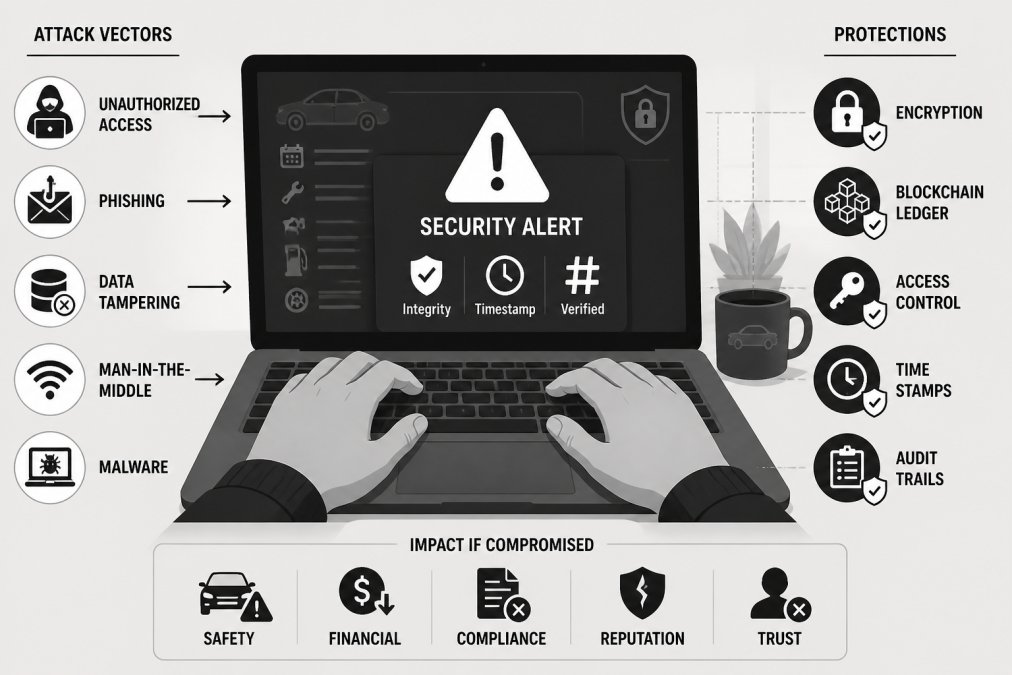
A tamper-proof digital logbook resists unauthorized modification, but no system is completely tamper-proof. Understanding specific threats helps you evaluate how well a platform protects against real attacks. The most common threat vectors are account compromise, server-side breaches, and insider threats.
Account compromise occurs when someone gains access to your login credentials through phishing, password reuse, or social engineering. Multi-factor authentication makes account compromise significantly harder because stealing your password alone isn't sufficient. However, if an attacker also compromises your phone or email account, they can still gain access. Using a dedicated authenticator app rather than SMS-based codes is more secure.
Server-side breaches represent the nightmare scenario where a hacker gains access to the company's database. If the database is encrypted and the company doesn't have access to encryption keys, stolen data remains unreadable. A digital logbook platform should be transparent about backup and recovery procedures, specifically whether backups are encrypted.
Insider threats come from employees who have legitimate access but use it maliciously. Companies mitigate insider threats through access controls, audit logging, and background checks. Man-in-the-middle (MITM) attacks intercept communication between your device and the company's servers. SSL encryption prevents this, but only if your browser verifies the SSL certificate correctly.
Ransomware attacks encrypt a company's data and demand payment for the decryption key. Some platforms maintain offline backups that ransomware cannot reach, allowing restoration without paying attackers.
Real-World Case Study: Data Breach and Recovery
In 2023, a vehicle maintenance tracking platform discovered unauthorized access to its customer database after a security researcher identified exposed API credentials on a public code repository. An attacker found them and used them to access customer records, including vehicle identification numbers, maintenance histories, and GPS coordinates.
The company immediately revoked the exposed credentials, notified affected users, and engaged a forensic security firm. They discovered approximately 12,000 customer records had been accessed, but because customer data was encrypted at rest, the attacker couldn't read the information without encryption keys. The company reset all customer passwords, offered two years of credit monitoring, and implemented new processes to prevent credentials from being committed to code repositories.
This case illustrates that encryption at rest prevented the breach from being worse, rapid response limited damage, and transparency maintained customer trust.
Security Audit Guide: How to Evaluate Your Digital Logbook
Before committing years of vehicle records to a digital logbook, audit its security practices. Start by checking whether the platform uses SSL encryption by looking for the padlock icon in your browser's address bar. If you don't see it, the platform is transmitting your data unencrypted.
Review the platform's privacy policy and terms of service, specifically looking for sections on data sharing, data retention, and your rights to delete data. Check whether the platform offers multi-factor authentication and whether it supports authenticator apps (more secure) or only SMS codes.
Look for third-party security certifications or audit reports. Some platforms undergo regular security audits by independent firms and publish summaries. Others obtain SOC 2 certification, verifying they meet security standards for data handling.
Ask the company directly about encryption key management, backup procedures, and disaster recovery plans. A company that can articulate clear answers has thought through security practices.
| Audit Element | What to Check | Red Flag |
|---|---|---|
| SSL/TLS Encryption | Padlock icon in browser; TLS 1.2 or higher | No padlock; outdated SSL versions |
| Multi-Factor Authentication | MFA offered; authenticator app support | MFA unavailable; SMS-only codes |
| Privacy Policy | Clear data collection, retention, sharing terms | Vague language; data sharing without consent |
| Third-Party Audits | SOC 2 certification; independent security reports | No audits mentioned; refuses to discuss |
| Encryption Key Management | Keys stored separately from data | Keys stored with encrypted data |
| Backup Strategy | Offline backups; regular testing | No backup plan; untested backups |
| Data Deletion | Immediate deletion upon request; timeline stated | Indefinite retention; no deletion option |
User Responsibilities in Maintaining Digital Logbook Security
The strongest encryption can be undermined by poor user practices. Your responsibility starts with password management. A strong password should be at least 16 characters, include uppercase and lowercase letters, numbers, and symbols, and be unique to the digital logbook platform.
Password managers like Bitwarden, 1Password, or Dashlane generate and store strong passwords securely, eliminating the need to remember complex passwords or reuse them. Enable multi-factor authentication on your account and on the email address associated with your account. If someone compromises your email, they can reset your digital logbook password. Protecting your email with MFA prevents this.
Review account activity periodically. Most digital logbooks provide a login history showing when your account was accessed and from which devices. Look for logins you don't recognize. Avoid using public WiFi to access your digital logbook unless the platform uses SSL encryption. If you must use public WiFi, a VPN (virtual private network) adds encryption protecting your traffic.
Pro Tip When you receive an email claiming to be from your digital logbook platform asking you to verify your account, don't click links in the email. Instead, go directly to the platform's website by typing the URL into your browser. Many phishing attacks use fake emails to direct you to fraudulent login pages. Direct navigation eliminates this risk.Never share your login credentials, even with customer support. Keep your device's operating system and apps updated. Security updates patch vulnerabilities that attackers exploit.
Future of Digital Logbook Security: Emerging Technologies
Blockchain technology offers potential for creating immutable vehicle records that cannot be altered without detection. A blockchain-based digital logbook would record each maintenance entry as a transaction in a distributed ledger. However, blockchain doesn't solve the fundamental problem of initial data entry, if you manually enter false information initially, blockchain doesn't prevent that.
Artificial intelligence and machine learning enable anomaly detection that identifies suspicious patterns in vehicle records. An AI system trained on millions of legitimate vehicle maintenance records can flag records deviating significantly from normal patterns, triggering human review.
Zero-knowledge proofs allow you to prove properties about your vehicle data without revealing the data itself. You could prove to a potential buyer that your vehicle has been regularly maintained without showing your complete maintenance history, preserving privacy while allowing verification.
Hardware security modules (HSMs) provide physical devices that store encryption keys and perform cryptographic operations without exposing the keys. A platform using HSMs significantly increases the difficulty of stealing keys through software attacks.
The security of a digital car logbook depends on the platform's architecture, the company's security practices, and your own habits. No platform is perfectly secure, but platforms using encryption, offering multi-factor authentication, maintaining transparent privacy policies, and undergoing independent security audits represent a reasonable security baseline. Before trusting a digital logbook with years of vehicle records, ask questions about encryption, backups, data retention, and the company's breach response procedures.
CarJourney simplifies organizing vehicle records with AI-powered maintenance logs and automatic VIN-based setup. The platform encrypts your data, offers multi-factor authentication, and maintains clear privacy policies about how your information is used. Whether you're documenting a project car's modifications or building a verifiable service history for resale, secure record-keeping ensures your vehicle's story remains yours to control. Start free with CarJourney and experience how centralized, protected vehicle documentation transforms the way you manage your automotive history.
Frequently Asked Questions
What encryption and security measures should a digital car logbook have?
A secure digital car logbook should use SSL encryption for data in transit, employ strong authentication protocols to verify user identity, and maintain audit trails to track all data access and modifications. Look for platforms that store data in secure cloud centers with backup systems, implement access control to limit who can view sensitive information, and provide tamper-proof logging to prevent unauthorized changes to vehicle records. Multi-factor authentication adds an extra layer of protection beyond passwords.
Can digital car logbooks be hacked or breached?
Like any digital system, digital car logbooks face potential vulnerabilities including ransomware attacks, unauthorized access attempts, and data loss risks. However, well-designed platforms mitigate these threats through encryption, regular security audits, and compliance with data protection standards. Real-world breaches are rare among established platforms that maintain strong security practices. Users can further reduce risk by using unique passwords, enabling multi-factor authentication, monitoring access logs, and choosing providers with transparent security policies and proven track records.
How do digital car logbooks comply with tax regulations in the United States?
Digital car logbooks meet IRS requirements for tax-deductible mileage documentation by providing automatic recording of trip data including date, time, start and end addresses, distance traveled, and purpose of trip. They create audit-proof records that satisfy regulatory compliance standards for business use documentation. The IRS recognizes electronic logbooks as valid alternatives to manual paper logbooks, provided they maintain data integrity and cannot be retroactively altered. Platforms that generate detailed reports and maintain complete trip histories help owners substantiate deductions during tax audits.
What car data privacy concerns should I address before using a digital logbook?
Before adopting a digital car logbook, understand what vehicle information and trip data the platform collects, how long it retains your information, and whether it shares data with third parties. Review the platform's privacy policy to confirm it complies with data protection laws and does not sell personal or vehicle information. Verify that GPS data and modification records remain private unless you explicitly choose to share them. Ask whether the service uses data centers within the US and what encryption protects your information at rest. Reputable platforms should clearly state they do not monetize user data or share it without consent.
This article was written using GrandRanker