 carjourney
From the CarJourney journal
What Is Vehicle Tracking? Technology, Benefits, and Uses
Most people think vehicle tracking is just a moving dot on a map. It’s not. What is vehicle tracking, really? It’s a technology stack that combines GPS positioning, telematics data, cellular transmission, and software analytics to give you a live and historical picture of how any vehicle operates. Whether you’re a parent monitoring a new driver, a small business owner managing three delivery vans, or a fleet manager overseeing hundreds of trucks, the same core technology applies. This guide breaks down how it works, what it can do for you, and how to use it well.
Table of Contents
- Key takeaways
- What is vehicle tracking and how does it work
- Personal trackers vs. fleet tracking systems
- Key benefits of vehicle tracking technology
- Challenges and considerations worth knowing
- How to implement vehicle tracking effectively
- My honest take on vehicle tracking technology
- Take your tracking data further with Carjourney
- FAQ
Key takeaways
| Point | Details |
|---|---|
| More than location data | Vehicle tracking combines GPS, telematics, and analytics to reveal speed, engine status, and driver behavior. |
| Two distinct use cases | Personal trackers prioritize simplicity and security; fleet systems prioritize analytics, scalability, and compliance. |
| Real financial impact | GPS tracking can reduce fuel expenses by over 13% through better routing and reduced idle time. |
| Setup determines value | Geofences, speed thresholds, and alert rules must be configured properly to generate useful, timely notifications. |
| Privacy matters | Employee and personal tracking requires clear consent policies and transparent data-sharing expectations. |
What is vehicle tracking and how does it work
At its core, vehicle tracking monitors movement, location, and operational status using GPS receivers and telematics hardware installed in or connected to a vehicle. The GPS receiver picks up signals from multiple satellites to calculate the vehicle’s precise position. That position, along with speed, engine status, and other data points, gets transmitted over a cellular network to a cloud-based server. You then see it all through a web dashboard or mobile app.
The data flow looks like this:
- Vehicle: A GPS tracking device installed via OBD-II port, hardwired under the dash, or placed as a portable unit
- Satellite network: The device locks onto multiple satellites to pinpoint location coordinates
- Cellular transmission: Data packets travel over 4G LTE (or in some cases LTE-M) to remote servers
- Server and cloud: Raw location pings get processed, stored, and cross-referenced with historical data
- Dashboard or app: You see live maps, route history, alerts, and reports
The hardware side handles data collection. The software side is where location pings become operational insights worth acting on.
Pro Tip: OBD-II connection points are preferred by many installers because they supply consistent power and deliver rich telematics data alongside GPS location, making them the simplest plug-and-play option for most passenger vehicles.
One detail that surprises most new users: not all tracking systems update at the same rate. Minute-level GPS sampling can be insufficient for reliable telematics verification. Second-level resolution is significantly more accurate for confirming vehicle activity, verifying work orders, or detecting unsafe driving in real time. When you’re comparing devices or subscriptions, ask specifically about update frequency.
Personal trackers vs. fleet tracking systems
The technology foundation is the same, but the needs diverge quickly once you look at scale and purpose.
Personal vehicle tracking
Personal GPS trackers typically plug into your car’s OBD-II port or sit as a magnetic portable unit hidden under the vehicle. They connect to a smartphone app and give you real-time location, trip history, geofencing alerts (notifications when the car enters or leaves a defined area), and sometimes engine diagnostic codes. The interface is designed for non-technical users. You open the app, see where your car is, and get notified if something looks off.

Common personal use cases include monitoring teenage drivers, protecting against theft, keeping tabs on a vehicle stored at a second location, or simply logging trips for reimbursement.
Fleet vehicle tracking
Fleet tracking operates at a different level. Fleet systems deliver operational analytics including route history, idle time reports, speed logs, geofence activity, mileage totals, engine hours, and maintenance alerts. They’re designed to be managed from a central dashboard that can handle dozens or hundreds of vehicles simultaneously, with role-based access for dispatchers, managers, and drivers.
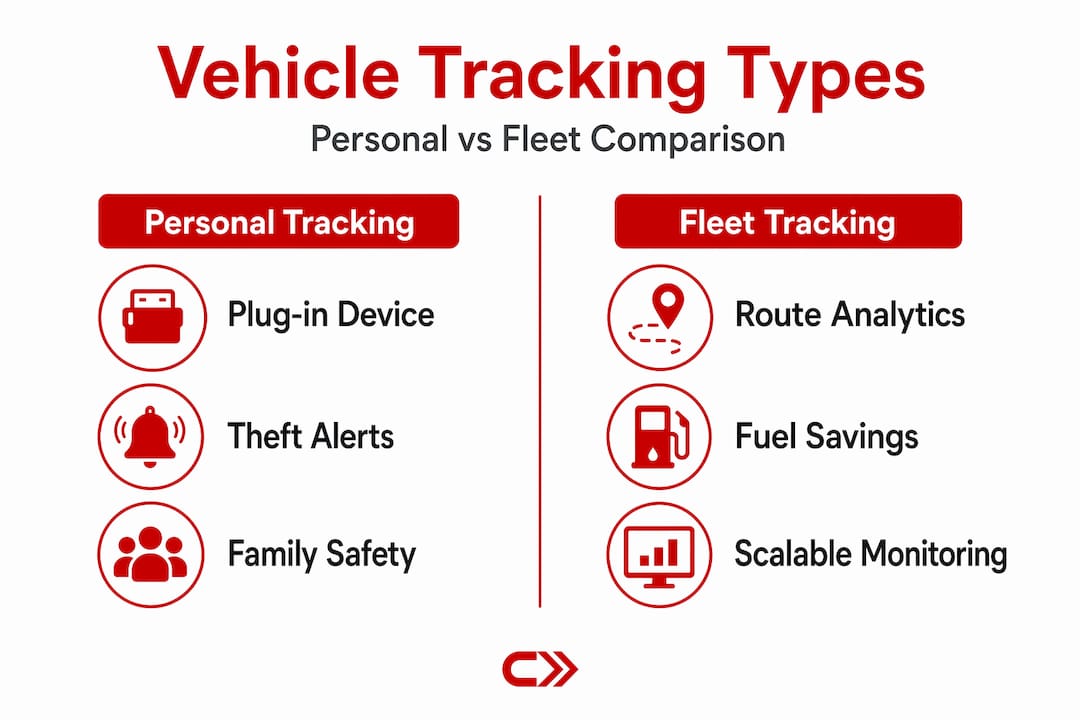
Here’s a direct comparison:
| Feature | Personal tracking | Fleet tracking |
|---|---|---|
| Real-time location | Yes | Yes |
| Geofencing alerts | Basic | Fully configurable |
| Driver behavior monitoring | Limited | Detailed (harsh braking, acceleration) |
| Route history | Yes | Yes, with analytics |
| Maintenance alerts | Sometimes | Standard feature |
| Multi-vehicle management | 1-3 vehicles | Unlimited |
| Reporting and compliance | Minimal | Full reporting suite |
| Installation complexity | Plug-and-play | Plug-in or hardwired |
Scalability is where fleet systems earn their cost. Adding a new vehicle to a fleet tracking platform usually takes minutes. A multi-vehicle tracking setup also lets you standardize maintenance schedules across your entire operation, something personal trackers simply don’t support.
Key benefits of vehicle tracking technology
The benefits split cleanly between financial outcomes and operational control. Both matter.
For businesses and fleets:
- Fuel savings. Better routing and reduced idle time directly cut fuel consumption. GPS tracking reduces fuel expenses by over 13% according to Aberdeen Group data cited by fleet operators, which compounds significantly across large fleets.
- Theft recovery. Real-time location data gives law enforcement a live trail. Recovery rates for tracked vehicles are substantially higher than untracked ones.
- Maintenance planning. Systems that monitor engine hours and mileage can trigger maintenance alerts before a breakdown happens. Connecting your vehicle maintenance tracking to your tracking data turns reactive repairs into scheduled service.
- Driver accountability. Speed logs and harsh-driving event records give managers concrete data to coach drivers, reducing accidents and insurance costs.
- Smarter dispatching. Knowing exactly where each vehicle is at all times means you can route the nearest driver to a job, not just the next one on a list.
For individuals:
- Theft protection. A hidden tracker is one of the strongest tools for recovering a stolen vehicle.
- Teen driver monitoring. Real-time speed alerts and geofence notifications let parents stay informed without riding along.
- Trip logging. Automatic mileage records make tax deduction documentation simple.
- Peace of mind. Knowing your car’s location from your phone is genuinely useful, even without a crisis.
Pro Tip: Set up geofence alerts around locations your vehicle should never visit during off-hours. Proper alert configuration with specific zone boundaries and speed thresholds is what separates a useful system from one that floods your inbox with irrelevant notifications.
Challenges and considerations worth knowing
Vehicle tracking technology is not plug-and-play perfection. A few friction points catch users off guard.
Privacy and consent top the list. Tracking data can reveal sensitive personal information, including daily routines, home addresses, and off-duty locations. For employers tracking company vehicles, written consent policies and clear communication about what data is collected and who can access it are not optional. For personal use, tracking a vehicle you don’t own without consent creates serious legal exposure.
Data accuracy is the next issue. GPS accuracy can degrade near tall buildings, in tunnels, or in areas with weak satellite coverage. Cellular dead zones can create gaps in tracking data that show a vehicle “teleporting” between points on a map. This matters most if you’re using tracking data for payroll verification or compliance reporting.
Other factors to watch:
- Alert fatigue. Poorly configured systems generate constant notifications that users start ignoring. Effective alerts require thoughtful setup of thresholds and schedules.
- Device installation quality. A loosely connected OBD-II plug or poorly routed hardwired cable can cause intermittent data gaps.
- Cellular coverage dependency. Most trackers rely on cellular networks for data transmission. In rural areas with limited coverage, real-time updates may lag or drop entirely.
“The highest-value tracking deployments are the ones where someone spent real time configuring the system rules, not just turning it on.”
This is where many buyers go wrong. They invest in hardware and a subscription, then never set up geofences or review reports. The data sits unused. The value comes from acting on what the system tells you.
How to implement vehicle tracking effectively
Getting started is simpler than most people expect. Here’s a practical sequence that works for both individuals and businesses.
-
Define what you actually need. A parent tracking one car needs a simple app-connected plug-in device. A logistics company tracking 50 vehicles needs a fleet platform with reporting, driver profiles, and API integrations. Don’t overspend on enterprise features you’ll never use.
-
Choose your installation type. OBD-II plug-in devices are the fastest to install and uninstall, making them ideal for personal use or short-term deployments. Hardwired devices are harder to tamper with and better for commercial vehicles. Portable magnetic trackers work for temporary monitoring or assets without an OBD-II port.
-
Set up your alerts before your first drive. Configure geofence boundaries, speed thresholds, and ignition-on notifications during initial setup. Don’t wait until something goes wrong to figure out how the alert system works.
-
Integrate tracking data with your maintenance workflow. Tracking mileage in real time means your auto maintenance schedule can trigger oil change reminders or tire rotation alerts automatically based on actual miles driven rather than a calendar estimate.
-
Review data regularly. Weekly route and behavior reports reveal patterns that real-time monitoring misses. A driver who consistently idles for 20 minutes per shift doesn’t show up as a problem on the live map, but shows up clearly in a monthly idle-time report.
-
Audit access and privacy settings. Confirm who on your team can view tracking data, how long records are stored, and whether your data-sharing practices comply with your state’s employment and privacy laws.
My honest take on vehicle tracking technology
I’ve spent a lot of time thinking about how technology intersects with vehicle ownership, and vehicle tracking is one of the areas where the gap between what the technology can do and what most people actually use it for is widest.
Most personal users I’ve seen buy a GPS tracker, confirm it works by checking their car’s location once, and then forget the platform exists. That’s not a technology failure. It’s a setup failure. The value isn’t in knowing where your car is right now. It’s in the patterns you discover over weeks and months. Which routes waste the most fuel? When does your teenager drive over 80 mph? How many miles did you put on the work truck last quarter?
I’ve also noticed that businesses rush to fleet tracking expecting immediate ROI and then get frustrated when the dashboard is full of numbers they don’t know how to use. The technology works. But the decisions that generate savings require someone willing to review reports and act on them.
The privacy dimension is real and often underweighted. I think clear, written policies about what data is collected and who can access it should be a prerequisite before deploying tracking on any vehicle driven by someone other than yourself. The legal and ethical considerations are not bureaucratic overhead. They protect both the business and the people working for it.
Vehicle tracking technology is genuinely useful. The people who get the most out of it are the ones who treat configuration and regular data review as part of the job, not as optional extras.
— Chally
Take your tracking data further with Carjourney
Understanding vehicle tracking is step one. Putting that data to work is where most owners and operators leave value on the table.
Carjourney is built by a team of gearheads and engineers who believe your vehicle data should actually do something useful. The platform uses AI to scan your service documents, answer questions specific to your exact vehicle, and connect tracking insights to maintenance planning so your service schedule reflects real-world usage instead of a generic calendar. Whether you’re managing one car or a growing fleet, Carjourney turns the data your tracker collects into decisions you can act on. Explore what it can do at carjourney.io.
FAQ
What is vehicle tracking in simple terms?
Vehicle tracking is a system that uses GPS and telematics hardware to monitor a vehicle’s location, speed, and operational status in real time, with that data transmitted over cellular networks to a dashboard or app.
How does vehicle tracking work technically?
A GPS device installed in the vehicle picks up satellite signals to calculate position, then sends that data along with speed and engine information over a cellular network to a cloud server where it becomes visible through a monitoring platform.
What are the main benefits of vehicle tracking for businesses?
Fleet GPS tracking reduces fuel costs, improves routing, supports maintenance planning, and provides driver behavior data that reduces accidents and lowers insurance premiums over time.
What types of vehicle tracking systems are available?
The three main types are OBD-II plug-in devices, hardwired units installed directly into the vehicle’s electrical system, and portable magnetic trackers, each suited to different use cases and installation requirements.
Is vehicle tracking legal for employee monitoring?
Vehicle tracking of company-owned vehicles is generally legal, but best practice and many state laws require employers to inform employees in writing about what data is collected, how it is stored, and who can access it.