 carjourney
From the CarJourney journal
Why Scan Service Documents: Benefits, Process, and Best Practices

Why scan service documents? Here are the core reasons
Scanning service documents converts paper records into secure, searchable digital files. The payoff is immediate and practical.
- Instant retrieval: Find any document in seconds by keyword, date, or document type instead of digging through filing cabinets.
- Security upgrade: Digital files carry role-based access controls and audit trails that paper simply cannot provide.
- Space and cost savings: Eliminating filing cabinets frees office square footage and cuts spending on paper, ink, and off-site storage.
- Disaster protection: Cloud backups survive fires, floods, and physical damage that would destroy paper records permanently.
- Compliance readiness: Digital audit logs satisfy HIPAA, SOX, and GDPR requirements that paper workflows cannot meet.
- Remote access: Teams working from home or across locations pull the same file simultaneously without waiting for someone in the office to locate it.
- Workflow speed: Approvals, invoice processing, and contract reviews move faster when documents are a search query away rather than a trip to a storage room.
Key benefits that make digitizing service documents worth it
Reducing physical storage through digitization cuts overhead by eliminating office space rentals, paper, ink, and toner expenses, while also protecting records against disaster damage. That combination of cost reduction and resilience is what makes the case so compelling for most businesses.
The productivity numbers are striking. According to Gartner’s 2023 research, employees waste a significant portion of their time searching for information, and a notable number of documents get lost or misfiled annually. Scanning with proper indexing cuts retrieval from hours to seconds.
Stat to know: AIIM research shows that removing paper from workflows can greatly improve customer response times. That kind of speed difference shows up in every client-facing interaction, from quotes to support requests.
Compliance is another area where digitization pays off fast. Regulatory frameworks like HIPAA, SOX, and GDPR demand tamper-proof audit trails that record every access and change. Paper documents offer zero traceability once they leave a filing cabinet. Digital records flip that entirely.
Remote and hybrid work has made paper a genuine liability. Documents accessed via cloud storage reach any team member instantly, regardless of location, which removes the bottleneck of waiting for someone in the office to retrieve and relay a physical file.
How the document scanning process actually works
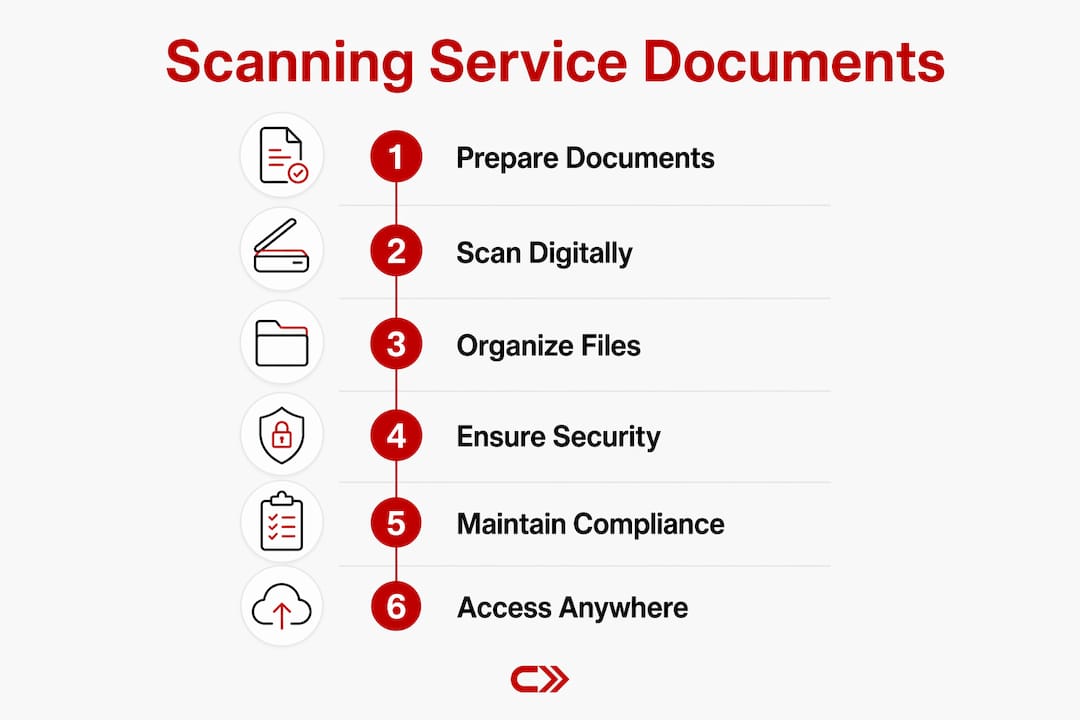
The scanning workflow has five distinct phases, and skipping any one of them tends to create problems downstream.
- Document preparation: Remove staples, paper clips, and rubber bands. Sort by document type and discard anything that does not need to be kept. This step alone determines how clean the final digital archive will be.
- Scanning: Choose equipment based on volume. Desktop scanners handle small batches. Production scanners process high volumes at speed. Large-format equipment captures blueprints and engineering drawings. Mobile capture tools work for documents gathered in the field.
- OCR processing: OCR converts scanned images into machine-readable text, making files fully searchable and indexable. Without this step, a scanned document is just a photograph you cannot search.
- Metadata tagging and indexing: Each file gets labeled with relevant fields such as date, document type, vendor name, or vehicle ID. This is what makes retrieval fast and reliable later.
- Storage and integration: Files move into a document management system, cloud repository, or directly into existing business software like accounting or CRM platforms.
Pro Tip: Remove staples and sort documents before handing them to a scanning service. It reduces prep time on their end, which typically lowers your cost and speeds up delivery.
For automotive owners and service businesses, scanning repair receipts and maintenance records follows this same workflow and pays dividends when it comes time to sell a vehicle or prove service history.

How scanning improves security and compliance
Paper is inherently insecure. A printed sheet can be copied or viewed by anyone nearby, and once it leaves a filing cabinet, there is no record of who touched it or when. Digital records change that equation entirely.
“Digital documents create automatic access logs that track every interaction, satisfying regulatory demands from HIPAA and GDPR. Encryption, password protection, and role-based access controls transform your security posture from vulnerable to resilient.” — Scannmore
Key security advantages of digitized service documents:
- Role-based access: Only authorized users see sensitive files. Permissions are set at the document or folder level.
- Encryption: Even if a file is copied or intercepted, the data remains protected.
- Audit trails: Every view, edit, and download is logged automatically, which is exactly what regulators want to see during an audit.
- Cloud backups: Off-site copies survive physical disasters that would destroy paper originals.
- Retention policies: Automated rules keep or destroy records on schedule, reducing compliance risk from holding documents too long or deleting them too early.
Digitization supports operational resilience in ways that go beyond simple record-keeping. When a crisis hits, whether a flood, a cyberattack, or a sudden shift to remote work, businesses with digital archives recover faster than those still dependent on physical files.
What to expect for turnaround times and service levels
Turnaround time depends heavily on volume, document condition, and how much preparation work is needed before scanning begins.
| Project type | Typical turnaround | Best fit |
|---|---|---|
| Small batch | — | Ongoing intake, single-department projects |
| Mid-size backlog | — | Department archive cleanup |
| Large backlog | — | Full office digitization, compliance projects |
| Ongoing daily intake | Same day turnaround | Active workflows, invoice processing |
Professional scanning services save a substantial percentage compared to managing the process in-house, largely because providers absorb the labor, training, and quality assurance overhead that internal teams underestimate.
Turnaround varies by volume and prep burden; professional services handle large backlogs efficiently, while in-house scanning suits steady, low-volume daily intake. A hybrid approach often wins: outsource the historical backlog to a service, then use software for ongoing document capture going forward. That split keeps costs rational across both phases.
Factors that slow projects down include mixed media (different paper sizes), damaged pages, handwritten documents that challenge OCR accuracy, and incomplete document preparation before submission.
Best practices for organizing and managing scanned documents
The biggest scanning challenge is not the scanning itself. It is what happens before and after. Without a standardized naming and tagging system, a digital filing cabinet becomes just as disorganized as the paper one it replaced.
- Set naming conventions before you start: Decide on a consistent format such as
YYYY-MM-DD_DocumentType_VendorNameand apply it to every file without exception. - Use metadata fields: Date, document type, project or vehicle ID, and department are the minimum. The more structured your tags, the faster retrieval becomes.
- Train your team: A naming convention only works if everyone follows it. One person filing documents their own way breaks the whole system.
- Integrate with existing software: Connect your document repository to accounting, CRM, or fleet management tools so records surface automatically in the workflows where they are needed.
- Set retention schedules: Define how long each document type must be kept and automate deletion or archiving at the end of that period.
Pro Tip: Treat digitization as an ongoing process, not a one-time project. Build a workflow for new documents arriving daily, and the archive stays clean without periodic cleanup sprints.
For vehicle owners, organizing car service paperwork with consistent naming and tagging makes it easy to pull a full maintenance history in seconds, whether for a warranty claim or a private sale.

Types of service documents commonly scanned
Service documents span a wide range of industries and use cases. The most commonly digitized types include:
- Automotive: Repair orders, oil change receipts, inspection reports, warranty documents, and parts invoices. Carjourney’s AI can scan these directly and link them to your specific vehicle’s history.
- Healthcare: Patient intake forms, lab results, referral letters, insurance claims, and consent forms covered under HIPAA.
- Legal and financial: Contracts, invoices, tax filings, audit records, and compliance certificates governed by SOX or state regulations.
- Construction and engineering: Blueprints, permits, inspection reports, and change orders, often requiring large-format scanning.
- Human resources: Employment applications, onboarding paperwork, performance reviews, and payroll records.
- Logistics and supply chain: Bills of lading, delivery receipts, customs documents, and vendor agreements.
Digital car maintenance records carry particular value for vehicle owners because they document the full service history of a specific build, which directly affects resale value and warranty claims.
Common challenges in document scanning and how to solve them
Most scanning projects run into predictable problems. Knowing them in advance makes them manageable.
Poor image quality: Damaged, faded, or crumpled documents scan poorly and produce OCR errors. Solution: flatten and repair documents before scanning, and use image enhancement settings on production scanners.
Inconsistent indexing: When different people tag documents differently, retrieval breaks down. Solution: define your metadata schema before the project starts and enforce it with a checklist or template.
Security gaps during transfer: Documents moving from your office to a scanning facility represent a vulnerability. Solution: use providers with certified chain-of-custody protocols and ask specifically about their data handling standards.
Duplicate records: Scanning without purging creates parallel paper and digital systems that contradict each other. Solution: establish a clear policy on when paper originals are destroyed or returned after scanning is confirmed.
Staff resistance: Teams accustomed to paper workflows sometimes revert to old habits. Solution: make digital retrieval faster and easier than the paper alternative from day one, and demonstrate the time savings directly.
Digitization done well is an operational change, not just a technology purchase. The businesses that get the most from it treat the process, the governance, and the training as seriously as the scanning equipment itself.
Key Takeaways
Scanning service documents delivers measurable gains in speed, security, and compliance, making it one of the highest-return operational changes a business can make.
| Point | Details |
|---|---|
| Retrieval speed | Gartner’s 2023 research found employees waste a significant portion of their time searching for information; scanning cuts that to seconds. |
| Cost savings | Professional scanning services save 30–50% compared to in-house scanning by reducing labor and quality assurance overhead. |
| Compliance readiness | Digital audit trails satisfy HIPAA, SOX, and GDPR requirements that paper workflows cannot meet. |
| Organization is the hard part | A consistent naming and metadata schema prevents a digital archive from becoming as disorganized as the paper files it replaced. |
| Hybrid approach wins | Outsource historical backlogs to a service, then use software for ongoing daily intake to balance cost and control. |